An RV for modern survival:
Link to the Unicat site:
http://www.unicatamericas.com/
Thursday, February 07, 2008


Wednesday, February 06, 2008
Using my Pocket PC iPAQ with Ubuntu
Notice I did not write 'syncing' Pocket PC with Ubuntu. I don't even bother syncing my iPAQ with Windows anymore, so I have no reason to sync anything. I don't use Outlook or Evolution. If there was a way to sync Pocket PC contacts and schedule with Yahoo Calendar and email, I'd probably use it, but I use that on my cell phone anyway.
 I have to admit, I really like My Toy, as I call it. I've had this one a long time. I got a RhinoSkin case for it:
 The case has really helped it take a beating. I've dropped it a few times, and the worst that happens is the SD card will pop out.
I don't use My Toy like most people use their PDA's. Mine is more of a tool. Here's what I use My Toy for:
Listening to audio books - one's I've either ripped myself, borrowed from someone else, or the one's I've downloaded from Audible.com. I don't really listen to music. I use GSPlayer from GreenSoftware. It plays MP3's, OGG, streaming audio and other files types I don't use. It has many more features than the standard Windows Media Player for Pocket PC. I highly recommend GSPLayer. I also use the Audible Player from Audible.com to play those files. Listening to audiofiles doesn't drain the battery as much as reading ebooks. The backlight goes off after a predetermined amount of time -I set mine for 2 minutes. Sometime, I'll do an audio-only battery time test.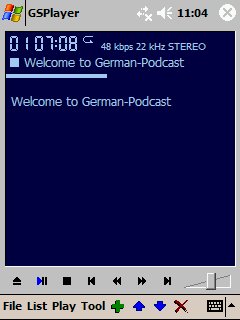
Reading eBooks -
My primary reader is Microsoft Reader, mostly because I have a collection of 15,000 ebooks I acquired before I started using Linux. Many of them came from Baen Free Library and Blackmask Online (now called 'Munseys'). Even though it's proprietary, I still recommend MS Reader.

I also use Mobipocket Reader. Mobipocket is owned by Amazon. I've started a small collection from Manybooks.net, and they don't support MS Reader, but do support Mobipocket. Mobipocket is also an excellent reader. The best think I like about the Mobipocket reader is the ability to make it full-screen mode - something I've not been able to do with MS Reader.

Adobe Reader for Pocket PC - isn't the best option. The 'respin' of the text to Pocket PC size rarely works. When it does, even then the pages turn slow. I really wish this format was better supported -if that's possible- because so many things are saved and published in .pdf (Portable Document Format).

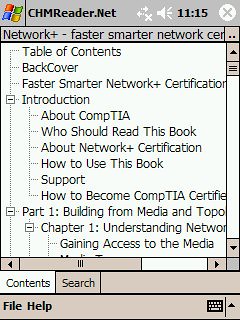
The main advantage to reading on a Pocket PC -or any digital device, for that matter, is the library. At any given time, I carry more than 500 eBooks in my pocket. Standing in line at the grocery store? Read a page or two.
Being able to change the font size or style is also helpful. As I grow older, my eyes aren't as good as they used to be. But, with an eBook, I can instantly increase the size of the print. I've discovered this helps with comprehension too.
Another advantage of reading on the Pocket PC - Backlight. When your significant other turns the light off while your reading, you're backlight is still on. To cut glare, I turn the screen brightness down to almost-the-last setting. Saves on battery life too, which brings me to my last point about eBooks.
The primary disadvantage is battery life. Reading an ebook requires the backlight to be on. In normal settings -for me about midway- reading an ebook will drain the battery faster than listening to one. Not nearly as much as using WiFi on the iPAQ though. Usually, I can get about 12-15 hours of reading before I have to refuel it.
Taking Pictures - I use the onboard camera to take most of the pictures on My Flickr page. Since this is an older iPAQ model, the camera isn't as good as I'd like, and the video capture quality is barely workable. Nancy's Nokia phone take better pics indoors and in dimly lit rooms. I'd love a camera as good as the ones on an iPhone.
Surfing the net - Since My Toy has WiFi, I use it to get online.
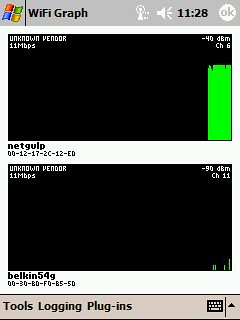
Site Surveying - The program WiFiFoFum works much like Netstumbler, and works better than ministumbler, in my opinion. I can use this program for doing wireless site surveys. Okay, I use it for Wardriving and Warwalking too. I use the program WiFi Graph to do get signal level analysis. These tools really help when I'm putting a FreekBox in for a Free Geek candidate. I can quickly determine if there's a community or municipal wireless service available nearby. Of course, I can't stop the FreekBox recipient from borrowing their neighbors wireless signal, if they want. I do recommend that they ask, and offer to share in costs.
Since I use Yahoo calendar for my scheduling, email and contacts, I don't need to sync that with my Pocket PC. I've set Yahoo to text me for important appointments. I would eventually like to have my phone and pda in one complete package, but what I have is working just fine for now.
Using the iPAQ with Ubuntu is much easier to do than I thought it would be. I purchased a $12 multi-reader (compact flash, SD, xD, etc). From the day I started using the iPAQ, I've used the SD card to keep most of my information. I have most of the programs I use to automatically save to the SD card, or I save the file there myself if that option isn't available. I save newly installed programs to the onboard flash storage, and back the entire thing up to a second SD card. I've completely boinked the system a few times, and had to do a complete restore. Luckily, it takes less than five minutes.
Since I'm a writer, I use the Pocket PC to do much of my writing. Instead of saving in Pocket Word format or even .doc format, I simply save it as a .txt file. I usually get prompted with "You will lose any formatting," as though Pocket Word can do any real formatting. I can bold and italic things later. Once the file is saved on my SD, and can open it in OpenOffice.org, or in Gedit. If I ever forget to save in .txt format, OpenOffice.org actually opens a .pwd file. Older OpenOffice.org versions use to have it as a save option, but I guess they decided to drop that.
While I do miss having the Pocket PC Documents folder synchronize with the Mobile Documents folder in Windows, using the SD card actually works just as well. By keeping my files there, I can use it just like most people use a USB Thumb Drive. The advantage I have is that files transfer way faster using the SD card than through the Pocket PC link on Windows. It takes about 2-5 minutes to load a few podcast on the Pocket PC through the Windows link, but with the SD card it takes 2-5 seconds. Same with moving pictures.
I don't know if the current crop of iPAQ's and other Pocket PC devices have an SD or miniSD card, but I understand most of them have something like that. Even the Smartphones.
When Pocket PC's first came out, you had to have them connected to Windows to install applications. Now, many app writers create a package you can install directly on the Pocket PC. Almost all the apps above have a direct install package available.
When Pocket PC's first came out, you had to have them connected to Windows to install applications. Now, many app writers create a package you can install directly on the Pocket PC. Almost all the apps above have a direct install package available.
Someday, when I have the guts, I'm going to try the Opie system for the iPAQ. I have a friend who's ported it for the rx3700 series, but not everything is working. It would be nice to be able to use Linux on it. I'll really have to do some thinking on it. I'd miss the eBook experience.
For now, I'll keep hacking away on Ubuntu and My Toy.
Friday, February 01, 2008
Am I a Socialist?
I'm known for a few quotes. "I'm not lazy! I'm a Personal Energy Conservationist" is a favorite of my family and friends. But, another of my quotes, "I'm all for socialism, as long as the government isn't involved."
I'm involved with an organization that seeks to reuse, rebuild, and recycle something. If it can be rebuilt or reused, it's virtually free. Basically, we're promoting the sharing of a resource.
FreeCycle.org is an organization that seeks to keep items in use by sharing what you no longer need or want with someone who does need or want it. FreeCycle is how Free Geek acquires many of it's computers and computer parts. When Nancy and I put a stainless steel cooktop on FreeCycle, it took a few day, but someone came and got it. While we no longer wanted it, someone else was either able to use it, or recycle it.
We live in a world with a three tiered economy:
- First Tier is brand new items that are purchased.
- Second Tier is used items that are resold.
- Third Tier is used items that are given away for reuse.
Ebay and Craigslist are good examples of Second Tier economy. FreeCycle and Freegan are examples of Third Tier ecomony.
More people are turning away from over-consumption, wasteful living, and avoiding earnings through ignoring abusive practices. Some people are discerning about what they invest in, even when it means a lower return. It's simple not worth it to those people to earn money if it means the company they invest in provides a good return partially due to abusive business practices.
Some people even seek to practice living making as little income as possible. Another one of my quotes; "I've found the best tax shelter there is - Make less money." In retrospect, I wasn't too far off-track. If you can live well with little money, why bother with the pursuit of a higher income? Once you realize you don't need or want more stuff, you can easily lower your tax burden.
Making less money doesn't mean you promote or are even able to live a lazy-ass lifestyle. Quite the contrary. Living with less money requires just as much work as making more money. The difference is that the work you do is completely for yourself, your family, or your community. The work and labor you do to live with less money increases your independence from a job, a boss, even the utility companies and the government. Your sweat equity goes toward your independence, not someone elses pocket.
Living such a lifestyle comes with a responsibility to share. To make such a lifestyle work, you have to realize you can't do it completely alone. Even animals know they survive best in packs, herds, schools or gaggles. It requires the help and sharing of resource from others who are working toward more personal independence. It requires sharing your efforts and resources with them. It really is true; the more you give, the more you get.
Non-profit organizations, and even underground sharing organizations are the largest growing part of the US economy. No government organization needed. It's becoming more evident that The path to financial independence doesn't mean increasing your income. It means needing less income.
Wednesday, January 30, 2008
Streetview, Anyone?
Maybe I'll stick with Mapquest or Yahoo Maps.
Actually, I still like Google Maps best.
Actually, I still like Google Maps best.
Saturday, January 26, 2008
New Tools
Neue Handwerkzeug.
Last Thursday, I went to University of Central Florida's Decision Days. You bring your transcripts, a check, and they can tell if you're in right there. I went to find out what I'd need to get in. As it turned out, I need just one more non IT class; German II. I took German I at Jacksonville State University in Alabama in 1983, but when I took German II at University of Georgia, I had to drop out of school during that semester, and never finished the class. So, I have to take to finish that requirement now.
Life is way different that it was in 1984. Back then, I had a text book to help me, and a few Berlitz Phrasebooks. We weren't allowed to copy the schools audio tapes, so I got no help there.
Now, in the matter of four hours, I was able to subscribe and download ten different German language study podcasts, 'preview' a full audio series, download free and 'previewed' software, bookmarked about fifteen German language teaching websites, and downloaded free German/English dictionaries for my Pocket PC. Since Thursday, I've gone through four lessons of the audio files, four lessons on the software, and practice some phrases with Nancy. I've got more files in my downloading hopper, and I'm about ready to use old business cards to label everything in the house.
Yeah. Life is different than it was in 1984. The accessibility to educational material is incredible. This is a big part of the reason I want to be involved with the delivery of educational content. By setting up kids with Edubuntu computers, I'm helping in a small way. If I can get many more of those machines out, I'll be helping in a large way.
Being an information junkie, this accessibility is intoxicating for me. Some would think it overwhelming. For me, it's like a kid in a candy store. I want it all.
Sunday, January 20, 2008
Wednesday, January 16, 2008
Geek Reading
I know it's hard to believe, but Geeks do indeed read. Not just web sites, tech manuals, and hacker instructions, but actual, honest-to-G~D fiction. That's right - Geek stories actually exist.
Geek Mafia
Right now, I'm reading Geek Mafia, by Rick Dakan:

Here's the blurb about the book:
Fired from a job he hated at a company he loved, videogame designer Paul Reynolds is drowning his sorrows in late-morning margaritas when he meets an alluring, pink-haired conwoman named Chloe. With her gang of techno-pirate friends, Chloe helps Paul not only take revenge on his former employers, but also extort a small fortune from them in the process. What more could a recently unemployed, over-worked videogame designer in Silicon Valley ask for?
I like Geek Mafia because the story uses actual technology hackers/crackers use. Anyone in Network Security should read Geek Mafia. The author's writing style needs practice and polish, but like I say, "A good story will beat poor style." Dakan's style isn't poor, by any means, but there are parts in the story where there's a bit too much telling instead of showing. But, the story of Geek Mafia is just plain good.
You can even download a free copy of Geek Mafia here. You can choose the format you want. If you click on the picture above, you can download the .pdf file of the book.
Here's Rick Dakan doing a talk about his book at PhreakNIC - a hacker convention:
And here's a link to the book on Amazon:
Little Brother by Cory Doctorow
This book isn't available yet, but when Neil Gaiman recommends something, I listen:
"I'd recommend Little Brother over pretty much any book I've read this year, and I'd want to get it into the hands of as many smart 13 year olds, male and female, as I can."
"Because I think it'll change lives. Because some kids, maybe just a few, won't be the same after they've read it. Maybe they'll change politically, maybe technologically. Maybe it'll just be the first book they loved or that spoke to their inner geek. Maybe they'll want to argue about it and disagree with it. Maybe they'll want to open their computer and see what's in there. I don't know. It made me want to be 13 again right now and reading it for the first time, and then go out and make the world better or stranger or odder. It's a wonderful, important book, in a way that renders its flaws pretty much meaningless."
Little Brother is about some hacker kids in San Francisco. Here's a blurb from Cory about the book:
"...hackers who declare war on the Department of Homeland Security. Every chapter has got a real-world how-to about why homeland security does not work, and how you can defeat it. And it talks about the math and computer science and information science behind the war on terrorism, the junk science behind the war on terrorism. But it's also meant to be an instruction kit for teaching kids to be culture jammers and technology jammers. I've been calling it Encyclopedia Brown meets The Anarchist Cookbook. My editor at Tor, Patrick Nielsen Hayden, called it Wikipedia Brown. So I just finished it, and finished the outline of book two. It's a two book series."
I've added a countdown button to the release of Little Brother on the right side of the page. I'm a Doctorow fan, not only in Cory's fiction but his activist efforts too. Here's a link to the Little Brother MySpace page:

The next book isn't a fiction, and I haven't read it yet. I highly intend too asap.
The Pirate's Dilemma - by Matt Mason
Here's a pretty cool presentation about the book:

And here's a link to the book on Amazon. You can read through the first few pages:
I hope this book comes out with an audio version soon.
Read up, folks.
Read up, folks.
Friday, January 11, 2008
Alex 2.0 is here
 Baby Alex Khoury was released at 11:38pm Thursday, January 10, 2007. The new package seems very stable, with no evident bugs to report, and mostly no problems. Alex Khoury 2.0 does require A LOT of dependencies: Blankey 2007, libmilk 4.5, Diaper 8.0 -which seems to require several daily updates, and many other packages. Unfortunately, Baby Alex comes with no documentation. But, like Linux, Baby Alex has a HUGE community of volunteers to help with the information of experience with previous Baby releases. One interesting thing about Baby package releases: Each package seems to be specifically designed only for the new user. There are occasional, but rare duplicates sent, and some users will receive more than one baby package at time. With all the dependencies involved with Baby, more than one seems like a lot of work with dependencies, especially the Diaper dependency.
Actually, I'm not sure if this release of Baby Alex is 2.0. It could be 10.0, for all I know. I'll ask the project's namesake later. I am aware that the Alex project does have 3 major forks, but they all seem to cooperate quite well.
Congrats to the Baby Alex team. Well done.
KDE 4.0 is here
 KDE 4.0 is here, and it looks pretty good. On the lottalinuxlinks podcast #59, Dave Yates interviewed Rich Johnson, a contributor to Kubuntu. Since Kubuntu uses KDE, Rich has experience through the development cycle of KDE 4. Rich indicated that the average user should probably wait for KDE 4.1.
I'll probably load up one of the more powerful Free Geek computers up with Kubuntu when KDE4 is integrated, and see how it feels.
Wednesday, January 09, 2008


Saturday, January 05, 2008
Bug Reporting
My friend, K.Mandla got called out on bug reporting. K responded, realizing that K should start doing more bug reporting, to 'give back to the community'. I admired K's response, and still reread K's post on bug reporting.
But, after listening to the recent Linux Action Show podcast (#69), I now question the person that challenged K on bug reporting.
I highly recommend listening to the show. The hosts make some good points on the responsibilities of who should be doing bug reporting. I hope this point gets discussed more throughout the year.
Monday, December 31, 2007
Still Not Getting It
I'm sure it's mostly me, but I struggle to find the advantages of selling pre-loaded Linux machines. I'm glad there are companies that do; System76, ZaReason, Dell to name the one's I really know. But I struggle to see the advantage. I like the idea of promoting open source software, and open drivers for hardware -which I think all vendors would do well to go with- but where is the advantage of sell a pre-loaded Linux machine?
There are thousands of used and older computer that run Linux very well. If someone is really a stickler, many of them will run Windows XP just as well too. Vista's turned into more of a flop than a wow, so the need for super hardware is mostly a niche market; Gamers, Engineers, Graphic and animation specialist.
The only real benefit from the absolute newest hardware is battery life on a laptop. Other than that, a used computer is just as good as a new one. A Pentium 4 machine with a good graphics card feels just as fast as a Core Duo.
Maybe my old hardware fetish clouds my judgment. Maybe my over-consumer stance clouds my judgment too.
Someone please tell me: Why spend $1200 on a new computer, when a $300 spent on rebuilt older hardware is just as good?
Disclaimer: Even after all this rambling, I'd love to have a System76 Darter, topped out. Four hour battery life? Yeah, baby!
Friday, December 28, 2007
A Few Reviews
In the last few days, I've set up a few VirtualBox systems. The idea is to install and use an OS well enough to get a good idea of it. As I try out a system, I focus on one primary principle- Ease of Use. I try to put myself in a frame of mind of a complete new computer user. It's not easy.
Here's my experiences so far:
Here's my experiences so far:

CentOS, short for Community enterprise Operating System, is a complete copy of Red Hat Enterprise Linux. The difference is, other than community support, CentOS comes with no official support. Oracle produces a copy of Red Hat called Unbreakable Linux. Fedora is Red Hat's cutting edge future work, but Red Hat Enterprise is what is used in business.
I decided to load CentOS in a VirtualBox machine so I could go through some Red Hat tutorials. The installation and desktop reminded me of my first experience with Linux - Fedora Core 4. Other than being an RPM based distribution, CentOS is pretty good.
Many businesses use Red Hat Enterprise, or even CentOS, on their servers. I need to know how to use it in a business setting. From what I can tell, CentOS is an excellent way to learn how to use Red Hat Linux.

PCLinuxOS is topping the distrowatch chart lately, so I decided to try it out and see why. Installing PCLinuxOS was fairly straight forward, but there were a few places where a new user unfamiliar with Linux might get confused. Just like Windows, it's easier to just go with the default settings.
PCLinuxOS is a KDE based distribution. There's a variant designed to look much like Windows XP/Vista, but it's not really supported by the forums.
Other than visual appeal, I didn't see anything really special about PCLinuxOS. I'm not sure why it's topping the Distrowatch list at the moment. It looks better than Ubuntu/Kubuntu, but the Ubuntu variants installation seems easier.
I'm not a KDE fan, so PCLinuxOS wouldn't be a primary choice for me. Don't get me wrong -I'm glad KDE offers a choice. Maybe KDE 4.0 will change my mind. But, for now, my desktop of choice is Gnome, and my distro of choice is Ubuntu.
PCLinuxOS is a KDE based distribution. There's a variant designed to look much like Windows XP/Vista, but it's not really supported by the forums.
Other than visual appeal, I didn't see anything really special about PCLinuxOS. I'm not sure why it's topping the Distrowatch list at the moment. It looks better than Ubuntu/Kubuntu, but the Ubuntu variants installation seems easier.
I'm not a KDE fan, so PCLinuxOS wouldn't be a primary choice for me. Don't get me wrong -I'm glad KDE offers a choice. Maybe KDE 4.0 will change my mind. But, for now, my desktop of choice is Gnome, and my distro of choice is Ubuntu.
gOS
I did a few reviews of gOS recently, but I wanted to comment a bit more on it. There have been some recent reviews of the Everex gPC, featuring gOS, and they were not raving reviews. gOS offers an excellent Ubuntu variant, but can be confusing for a completely new user. I still think gOS is a good option for millennium kids, but not for the average person. Everex would have done better to go with a straight forward version of Ubuntu.
Over the next year, I'm going to try out the top 20, and maybe a few more, Linux distros. I'll report on them as I experience each one. Unfortunately, a Virtual Computer doesn't give you the real information about a Linux installation. A true test would be to install and use it on a laptop.
Friday, December 21, 2007
Windows Security
The more I think about it, the more I suspect that I may never have had a malware problem on my Windows partition. I used to figure that if I had Windows running longer than six months, it got malware. At least, that was my previous experience. But, that experience was based on running Windows only.
In the last 1 1/2 years since I installed my dual boot desktop, I used Windows for schoolwork, iTunes and Audible.com. I used Linux for everything else, especially random internet surfing. If I didn't have school, I'd wouldn't use Windows at all. I get it through school, as part of our materials for training. I rarely use Windows for surfing the internet, and I never went on myspace or facebook with it. Most of my mail was opened in Ubuntu, and unless I know who it's from, I don't open attachments. So, looking back, I rarely exposed Windows to potential malware.
Maybe most people who insist on using Windows should have a dual boot system. They could surf and email from Linux, and do whatever they need to for work or school in Windows. As more applications are available online, there will be less of a need for a particular operating system, be it Windows, Mac, or Linux. That's a whole 'nuther security issue itself, though.
Upgrades
The Tinkering Monster got me. I did the upgrades on my desktop:
Here's the catch: Ubuntu to all of 2 hours to:
- Graphics card- from 32 mb ATI to 128 mb Nvidia GeForce4 MX 440. -- I did this upgrade first. When I turned the computer back on, Windows came on, but obviously wasn't using the drivers. Ubuntu 6.06 Dapper Drake didn't work with the Nvidia card. It could have, but I didn't bother to go through the xorg.conf file to fix it. I was already planning more upgrading anyway.
- Pentium 4 processor from 1.8 GHz to 2.26 GHz - The major difference isn't necessarily the speed of the processor, rather the speed of the bus. From 400 MHz to 533 MHz. That is where the speed really comes from. Anyway, the computer worked right away. A good bit faster.
- Dbanned the hard drive, reinstalled Windows and Ubuntu.
The reinstallation is something I've been wanting to do. I save all my personal data and setting to external hard drives, wiped the disk, then reinstalled my dual boot system. It's REALLY important to install Windows XP first. Not that you couldn't do it another way, but it makes setting up a dual boot much easier. I installed Windows, did all the updates, installed the anti-virus and anti-spyware, the defragged the disk and installed Ubuntu.
Here's the catch: Ubuntu to all of 2 hours to:
- Install the system
- Do the system updates
- Enable all the repositories I want
- Load all the software I want
- Copy specific personal data to My Home folder.
The installation alone took almost 2 hours, and that was before the updates. 10 hours later, almost all the updates were finally done. I counted seven rounds of restarts. That should have been the justice departments punishment for Microsoft: to restart their entire business seven times a day. I eventually got most of what I need installed. Once again, I've learned what I use and what I don't use. 95% of the software I installed on the Windows side is open source. A few proprietary programs, but not many. I'll go without Microsoft Office as long as I can, and use OpenOffice.org exclusively. I would love to say that I use Open Source exclusively, but I'm in school for IT, so it's not an option just yet. I'd love to say that I use Ubuntu Linux exclusively, but I have to know how all the other Operating Systems work: Windowx XP/Vista, Mac OSX, Unix, Solaris, FreeBSD. Yes, I know the last four are basically the same thing. I have to know how to use them.
The main advantage to upgrading Ubuntu from 6.06.1 to 7.10 is being able to use the files in the Windows partition. Click on the disk, browse to the folder with the file I want, and use it. I don't even have to drag it to the Ubuntu side. And no extra packages to install to make that happen. 7.10 also comes with the latest packages/programs for Ubuntu.
The only real upgrade left that I really need is the ram. It's 1 GB right now, but 2 GB would work better for me. If I wasn't in school, I'd probably not bother, but many of my classes use Virtualization for learning and practice. For now, 1 GB is fine, but I'll probably have to upgrade the ram with my own money. If I get a job, that is.
The only real upgrade left that I really need is the ram. It's 1 GB right now, but 2 GB would work better for me. If I wasn't in school, I'd probably not bother, but many of my classes use Virtualization for learning and practice. For now, 1 GB is fine, but I'll probably have to upgrade the ram with my own money. If I get a job, that is.
I did decide to scavenge the Gateway box for this upgrade. The Gateway isn't dead though, not by a long shot. I had some extra processors, so I put in a 2.8 GHz Celeron in it, and the 32 mb ATI graphics card that was in my Dell to the the Gateway machine. Installed Ubuntu, and it's ready to go to a trusty volunteer. I just hope whoever gets the machine doesn't try to upgrade the ram.
Friday, December 14, 2007
What to do?
The semester is over. The urge to tinker is overwhelming. I have plenty of machines to work on for Free Geek, but that's almost getting routine. A good routine:
- Pickup or receive equipment
- Wipe the hard drive(s)
- Check and upgrade if necessary
- BIOS
- Memory
- Graphics card
- Load Ubuntu or Xubuntu as an OEM installation
- Deliver to recipient or have them pick up
- Usually deliver, since people who can't afford a computer usually can't afford a car.
- Prepare for the inevitable onslaught of "Thanks You"s
The Gateway I recieved is a pretty good one, except for the RDRAM. Now RAMBUS is actually a really good technology, but the company messed themselves up on the licensing, so RAMBUS is just way too expensive. To upgrade the memory from 512 mb to 1 Gb would cost almost $500. Not practical at all. The only choice with a machine that uses RDRAM is to wait till other machines like that come it, and use those memory chips. For our purposes, RAMBUS is a show-stopper.
So, I've decided to scavenge the Gateway for parts. As I am the primary volunteer, I get first pick of best-of hardware. So, I'm going to try to use the parts from the Gateway to upgrade me Dell:
- The Pentium 4 processor from 1.8 GHz to 2.26 GHz
- The graphics card from 32 meg to 128 mg
Those would be the main upgrades. I would eventually want to upgrade the memory from 1 GB to 1.5 GB on too. I use my desktop for lots of projects using a virtual machine, so memory is important to me. When you have two virtualized servers going, and two virtualized desktops going, memory tends to forget.
The problem is: my desktop is working fine. It dual boots Windows XP and Ubuntu 6.06 Dapper Drake. I set it up like that right after Dapper Drake came out, so it was around June 2006. I've been running that setup this long - probably the longest I've gone without doing a system reinstall. Every once in awhile, I'll scan my Windows installation with different tools for malware, but nothing comes up. I use the Ubuntu side to do 90% of my internet surfing or IMing. I use the Windows side mostly for school assignments that require Windows, so my Windows side is rarely exposed to the outside world.
Windows XP SP3 (service pack 3) is due out soon, and I hear good things about it -as far as security and speeding things up. Also, Ubuntu 8.04 Hardy Herron will be an LTS release (Long Term Service, like Dapper Drake is) meaning 3 years support for the desktop. My original idea was to wait till both are available, and do the hardware upgrades and system reinstalls then. Part of the reason is that I don't look forward to the Windows installation. Getting the system installed, updated, and programs reinstalled and updated can take almost 48 hours -or more even. Getting everything setup and installed just like I want -including programs and desktop settings- in Ubuntu take two hours, three at the most. It would probably be shorter if I didn't walk the dogs during the install process.
There is also the possibility that if I wait till both of those are available, even better equipment donations will come through Free Geek, and I can use some of those. That, and while RAMBUS is expensive, it runs very well with just 512 mb. I could give the Gateway to a volunteer -provided they'd never need to upgrade the memory.
There is also the possibility that if I wait till both of those are available, even better equipment donations will come through Free Geek, and I can use some of those. That, and while RAMBUS is expensive, it runs very well with just 512 mb. I could give the Gateway to a volunteer -provided they'd never need to upgrade the memory.
So, to my avid readers, what do you suggest?
Thursday, December 13, 2007
Finals Are DONE!
My first final -Advanced Network Security- took all of 7 minutes. 40 questions, multiple choice. Five seconds or more a question? Something like that. I got 100.
My second test -Introduction to Business- took even less time. I got to class -filled in the scan tron sheet with my name and school number- then the teacher took up the sheet from me and another girl, and said, "Thanks. You can go."
Now, when a teach does and says that, my instant assumption is that I've done something wrong. "Whad I'do? My book? I'll take it off the desk."
"No. You got an A," she replied.
The who's from Ukraine, and has been speaking English for only a few months, grabbed my arm and said, "Come on, let's go."
Clueless me is still going, "Huh?"
"Merry Christmas," the teacher said.
"Merry Christmas?" I replied, still clueless.
When we got out to the hall, Nelya told me what was going on. Evidently, she and I had above a 95 average, and were the only ones in the class who'd done all the work. We could have failed the final, and still gotten an A. Reward for effort.
My third final -Introduction to Network Security- was about as fast as the other test, except I missed two questions on Public Key Cryptography- Sender/Receiver keys and digital signatures and digital certificates. I get all those a bit confused. I'll get them ironed out eventually. Maybe a bit of practice with GNUPG (GNU Privacy Guard) will help.
I made a 95 on the Intro to Security, after I'd made a 100 on the Advanced Security. Go figure.
Today, I took my last final -Windows Server 2003 Network Infrastructure. I got a 97. The class uses SamAcademy by Course Technology. I don't like that product. TestOut is WAY better. Learnkey is somewhere in between. The final was completely practical, using the simulator environment in SamAcademy. Windows always you many ways to do the same thing, like close a window. You can click the X in the top right corner, click "File" and select close, or right click on the Window bar and select close. SamAcademy lets you do it only ONE way in their sim. Like Mac OSX, you have to do it THEIR way. The problem is you get use to doing it one way, and you reflexively do that way. Then you get the "INCORRECT ACTION". How Soviet. This time, I went back through all the simulations, wrote down everything step by step (in an OpenOffice.org file, of course- who uses paper?) and followed it in the test. I only missed one question -and I think it was sim error, not mine. But I got a 97 anyway, so I'm not complaining.
Even after all that, I consider my best achievement this semester to be getting our printer networked in Ubuntu. It's cool being able to print wireless from my laptop.
I've Been an Elitist!
Sometimes it's difficult to see when it's happening. In the USA, pretty much any purchase you make puts you in the category of an elitist. The massive overconsumption we do (and I'm just as guilty as anyone) would take six and 1/2 planets to sustain. We've gone past the point of abusing our resources to the point of running them dry.
What I never realized was the impact of actually using Windows. The exclusionary and elitist statement that even turning on a Windows machine says is pretty big. Bruce Byfield, a journalist and editor for the Open Source Technology Group, did a really good article on the subject in November 2006. I highly recommend reading it.
I have a Windows Server 2003 test due tomorrow. To quote the dinosaur in Toy Story, "Now I have guilt!"
Thursday, December 06, 2007
Compiz
Today, I received a donation of a Gateway tower, 2.26 Ghz, 512 mb RAMBUS ram, 40 gb hard drive @ 7200rpm, Nvidia GeForceMX 440 graphics (128mb). Except for the RAMBUS ram, it's a really nice machine. Rambus is actually an excellent and fast type of memory, but the company screwed themselves with a stupid licensing deal, and their memory is WAY too expensive. It would take $500 or more to take this computer up to 1 gb of memory, and it's not really necessary with the RAMBUS type of memory to do that.
This computer is the first I've had with a good enough graphics card to use Compiz-fusion - the desktop effects that comes with Ubuntu. I decided to enable the effects, install the effects manager and play a little.
Mac OSX and Vista got nuthin over compiz for desktop effects! Here's a demonstration of what the desktop effects can do:
While I like the effects, I probably would rarely use them myself.
Wednesday, December 05, 2007
Truecrypt is DONE!
While I mean my presentation is done, it would be just as true to say, "Truecrypt is DONE" as an application. This is one incredible program.
I spent most of the end of last week watching Truecrypt tutorials, like this one on YouTube, or this one on Irongeek. The Irongeek one is especially informative. I spent most of Sunday and Monday actually practicing using Truecrypt. It's pretty easy to use, but to use it to it's full potential takes practice. I first learned about Truecrypt on Security Now! with Steve Gibson and Leo Laporte, espisode #41. I highly recommend listening to it a few times if you intend on using Truecrypt.
- If you have files that you don't want anyone else to see, use Truecrypt
- If you use a laptop, and have sensative files on it, use Truecrypt
- If you keep any files on a USB jumpdrive, use Truecrypt - even regular files can contain sensitive information that can be used against you
- If you want to keep important records with your attorney, mother, best friend - make a CD with Truecrypt and have them keep it - just in case of fire, hurricane, or flood
- If you work for Her Majesty's Revenue and Customs, and you're sending a CD with 7.25 million peoples ID's by courier service - use Truecrypt. And get a different courier service!
- If you suspect your ex has hired private investigators to find out how much money you really have - use Truecyrpt.
- If you finally have evidence that the Electoral College if fake - use Truecyrpt
I really can't say enough about how important a tool Truecrypt is, and how important the skilled use of Truecrypt can be for a company with sensitive information - even if that company is only one person. At the very least, watch the Irongeek video on Truecrypt.
The Linux version of Truecrypt is command-line based, and the Truecrypt people are working on a GUI for it. A Mac OSX version is suppose to be forth coming too. I'll play around with the command-line version over the holidays, and report back.
Subscribe to:
Posts (Atom)